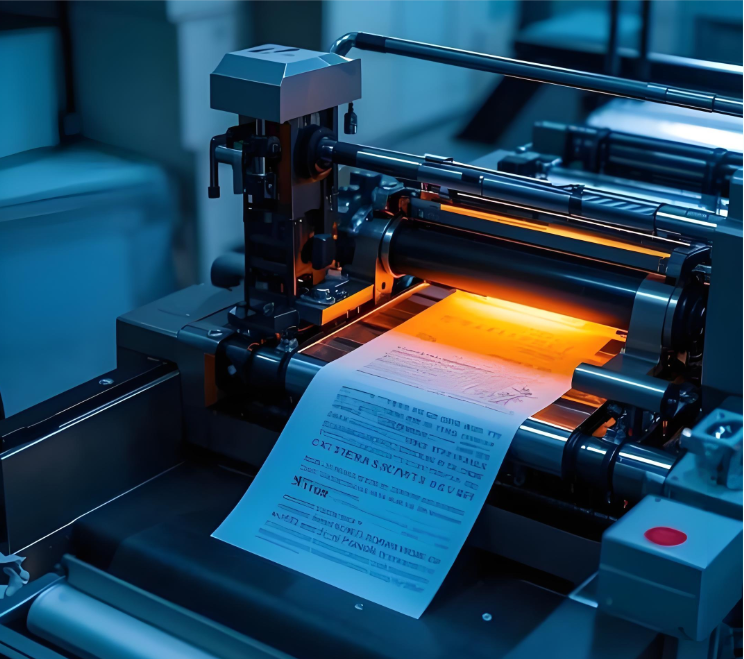
Ribbon wrinkle frustrates many users of thermal transfer printers. It damages print quality and reduces efficiency. To prevent ribbon wrinkle, users must focus on proper ribbon handling, optimized printer settings, and regular maintenance. Understanding the causes of ribbon wrinkle, like incorrect tension or misaligned parts, is essential. This knowledge helps prevent ribbon wrinkle in all thermal transfer printers. A well-maintained ribbon , printer delivers consistent results. A properly loaded ribbon , printer also avoids issues.
Key Takeaways
-
Load the ribbon correctly and set the right tension. This stops the ribbon from slipping or buckling.
-
Adjust printer settings like print head pressure and heat. This helps the ribbon move smoothly.
-
Clean your printer regularly. Clean the print head and rollers to stop dirt from causing wrinkles.
-
Use good quality ribbons and labels. Make sure they fit your printer to avoid problems.
Proper Ribbon Loading and Tension
Correct ribbon loading and tension are fundamental steps. They help prevent ribbon wrinkle in thermal transfer printers. Improper installation often causes many printing problems. Users must pay close attention to these details.
Load Ribbon Correctly
Always install the ribbon correctly. Check the ribbon core notches. They must sit squarely on the supply spindle. This prevents the ribbon from slipping during printing. A ribbon that slips will not feed smoothly. This can lead to immediate ribbon wrinkle. Ensure the ribbon unwinds from the correct side. Follow the printer’s specific loading diagrams. Incorrect loading often causes the ribbon to buckle or tear. This impacts print quality.
Verify Ribbon Tension
Ribbon tension is crucial. The supply spindle holds the new ribbon. If its tension is too heavy, the ribbon will buckle. This creates slack and causes ribbon wrinkle. The take-up spindle collects the used ribbon. It needs just enough tension. This tension keeps the ribbon taut. It prevents ribbon wrinkle as the ribbon moves. Operators should adjust the tension settings. Many printers allow users to adjust the tension settings. This fine-tuning helps maintain smooth ribbon movement. Proper tension helps prevent ribbon wrinkle effectively.
Check Ribbon Path Alignment
Inspect the entire ribbon path. Ensure the ribbon moves freely through all guides. The media guide must also be correctly positioned. It keeps the label stock aligned. Misaligned components can cause the ribbon to rub or snag. This creates friction and leads to wrinkling. Verify that all rollers and guides are clean. They should also be free from obstructions. Correct alignment ensures a smooth ribbon flow. This helps prevent ribbon wrinkle.
Optimize Printer Settings
Printer settings directly impact ribbon behavior. Adjusting these settings helps prevent ribbon wrinkle. Users can fine-tune various parameters for optimal performance.
Adjust Print Head Pressure
Printhead pressure is a critical factor. Too much pressure can cause the ribbon to stick or drag. This often leads to ribbon wrinkle. Too little pressure results in poor print quality. Users adjust printhead pressure using adjustment knobs on the printer. They also adjust the ribbon tension bar and the ribbon deflector bar. These adjustments help resolve ribbon wrinkle. For industrial barcode printers, adjusting the pressure pillar is crucial. This adjustment depends on the wrinkle’s lean, whether it is left or right. Operators must adjust the tension settings carefully. This ensures even contact between the printhead, ribbon, and media.
Configure Heat Settings
Heat settings also play a significant role. High print head heat settings can cause the ribbon to melt or stick. This creates friction and leads to wrinkling. Using an incorrect ribbon type with high heat also causes issues. Each ribbon type has a specific temperature range. Users should match the heat setting to the ribbon and media. This helps prevent ribbon wrinkle. Proper heat ensures the ink transfers smoothly without damaging the ribbon.
Set Appropriate Print Speed
Print speed affects ribbon movement and heat transfer. A print speed that is too fast might not allow enough time for proper heat transfer. This can result in light or incomplete prints. It can also cause the ribbon to move erratically. This erratic movement can lead to ribbon wrinkle. A slower speed allows for better heat transfer and more stable ribbon movement. This improves print quality and helps prevent ribbon wrinkle. Proper printhead alignment also contributes to consistent printing on a thermal label printer. Users should experiment with different speeds to find the optimal setting for their specific application.
Regular Printer Maintenance
Regular maintenance keeps thermal transfer printers working well. It helps prevent common issues like ribbon wrinkle. A clean and well-maintained printer produces high-quality labels consistently.
Clean Print Head
Users must regularly clean the print head. Debris and adhesive buildup on the print head cause poor print quality. They also lead to ribbon damage. A dirty print head can create friction. This friction causes the ribbon to stick or tear. This often results in ribbon wrinkle. Always use approved cleaning supplies. Follow the manufacturer’s instructions to clean the print head. Cleaning the print head ensures even heat transfer. It also extends the life of the print head. Make sure to clean the print head after every ribbon change or a certain number of labels.
Inspect Platen Rollers
The platen roller supports the media as it passes under the print head. It also helps move the ribbon. Over time, platen rollers can become worn, cracked, or dirty. These issues affect ribbon and media movement. They can cause the ribbon to slip or bunch up. This leads to ribbon wrinkle. Users should regularly inspect and replace worn-out rollers. They must also clean the rollers to remove any adhesive or dust. Inspect and replace worn-out rollers to maintain proper tension and alignment. This action helps prevent ribbon wrinkle.
Clean Ribbon Guides and Sensors
Ribbon guides direct the ribbon’s path. Sensors detect the ribbon’s presence and movement. If these components are dirty or obstructed, the ribbon cannot move smoothly. Dust or adhesive on guides can cause the ribbon to snag. Dirty sensors might misread the ribbon position. This leads to incorrect tension or feeding. Clean all ribbon guides and sensors regularly. This ensures the ribbon , printer operates without interruption. Proper cleaning helps prevent ribbon wrinkle and ensures consistent print quality.
Use Quality Ribbons and Media
High-quality ribbons and media are essential for optimal printing. They directly impact print clarity and printer longevity. Using the correct supplies helps prevent many common printing problems.
Select Compatible Ribbons
Choosing the right ribbon is crucial. Users must match the ribbon’s size to the printer’s specifications. Incorrect sizes can cause poor print quality or ribbon breakage. Always consult the printer’s manual or compatibility guides. These resources confirm the correct ribbon fit for the specific model. For example, GMP Labeling’s Compatibility Guide helps users find suitable options. Users should avoid overlooking printer specifications. They must always check that the ribbon size aligns with the printer’s settings and capacity. This prevents poor-quality prints or ribbon breakage. Selecting compatible ribbon and label combinations ensures proper adhesion and print durability. Different applications require specific ribbon types, such as wax, resin, or wax-resin.
Ensure Media Quality
The quality of the media, such as labels or tags, also affects printing. Poor-quality media can have uneven surfaces or inconsistent coatings. These flaws can lead to ribbon sticking or uneven print transfer. This often results in ribbon wrinkle. Users should always use media recommended by the printer manufacturer. This ensures optimal performance. Using compatible ribbon and label combinations prevents issues. It also guarantees clear, readable prints.
Store Supplies Correctly
Proper storage of ribbons and media is vital. Store them in a cool, dry place away from direct sunlight. Extreme temperatures or humidity can damage supplies. Ribbons can become brittle or sticky. Media can warp or absorb moisture. Damaged supplies can cause feeding problems in the ribbon , printer. This can lead to ribbon wrinkle and poor print quality. Correct storage helps prevent ribbon wrinkle and maintains the integrity of compatible ribbon and label combinations.
Troubleshoot Ribbon Wrinkle
When ribbon wrinkle occurs, users must systematically diagnose the problem. Identifying the root cause helps resolve the issue quickly. This section guides readers through effective troubleshooting steps.
Identify Wrinkling Location
Observing where the ribbon wrinkle forms provides crucial clues. Users should first pinpoint the exact location of the wrinkle. A helpful technique involves breaking or cutting the ribbon from the rewind spindle. Then, print several test labels. Watch the ribbon and label feed together. This direct observation reveals where the ribbon wrinkle begins. It shows if the wrinkle starts on the supply side, under the printhead, or on the take-up side. This visual inspection helps identify the specific causes of ribbon wrinkle.
Check for Worn Parts
Worn or damaged printer components often lead to print quality problems. Users should inspect the printhead for any scratches or debris. A damaged printhead can drag the ribbon, causing it to wrinkle. Examine the platen roller for wear, cracks, or flat spots. A faulty platen roller cannot properly grip the media and ribbon. This leads to uneven feeding and ribbon wrinkle. Check all ribbon guides and tension rollers. Worn guides can misdirect the ribbon. This creates friction and contributes to the causes of ribbon wrinkle. Replacing worn parts helps prevent ribbon wrinkle.
Consult Printer Manual
The printer manual serves as a valuable resource for troubleshooting. It contains specific diagrams and instructions for each printer model. Users should refer to the manual’s troubleshooting section. This section often lists common issues and their solutions. The manual provides guidance on adjusting tension settings or replacing specific parts. It also offers detailed steps to prevent ribbon wrinkle. Following the manufacturer’s recommendations ensures proper printer operation.
Proper loading, optimized settings, consistent maintenance, and quality supplies are crucial steps. They help prevent ribbon wrinkle in thermal transfer printers. Consistent application of these measures ensures high-quality, consistent prints. It also extends the lifespan of thermal transfer printers. Implement these tips for a smoother printing experience. This proactive approach minimizes ribbon wrinkle and maximizes efficiency for all thermal transfer printers.
FAQ
Why does the ribbon keep wrinkling?
Ribbon wrinkling often happens due to incorrect tension. It can also occur from improper loading or misaligned printer parts. Sometimes, a dirty printhead or worn rollers cause the issue.
Can incorrect printer settings cause ribbon wrinkle?
Yes, incorrect settings can cause ribbon wrinkle. High printhead pressure or excessive heat can make the ribbon stick. An unsuitable print speed also contributes to the problem. Adjusting these settings helps prevent wrinkles.
How often should users clean their printer to prevent ribbon wrinkle?
Users should clean the printhead after every ribbon change. They should also clean it after printing a certain number of labels. Regularly inspect and clean platen rollers, ribbon guides, and sensors. This prevents debris buildup.
Does the type of ribbon matter for preventing wrinkles?
Yes, the ribbon type matters significantly. Users must select ribbons compatible with their printer and media. Using an incorrect ribbon can lead to poor heat transfer. This causes sticking and wrinkling. Quality ribbons ensure smooth printing.